01
Before you start
Treat Bandit DarkRoom like beta software. Use backup copies of important images, keep original camera files safe, and test with a folder that you can afford to experiment with.
Recommended beta test folder:
Create a folder with 10–30 mixed files: RAW photos, finished JPEGs, high-contrast shots, dark interiors, bright chrome, portraits, and a few images you already know well.
02
Download, install, and launch
Download the beta package
Open the Download page and select Download Bandit DarkRoom Beta. The current placeholder package is named Bandit_DarkRoom_Beta.zip.
Extract the ZIP file
Extract the package to a clean folder. Avoid running the app directly from a compressed archive because it may prevent supporting files from loading correctly.
Launch Bandit DarkRoom
Run the included application or installer. Review any beta notes shown on launch, then open a small test folder before trying a large shoot.
03
Understand the workspace
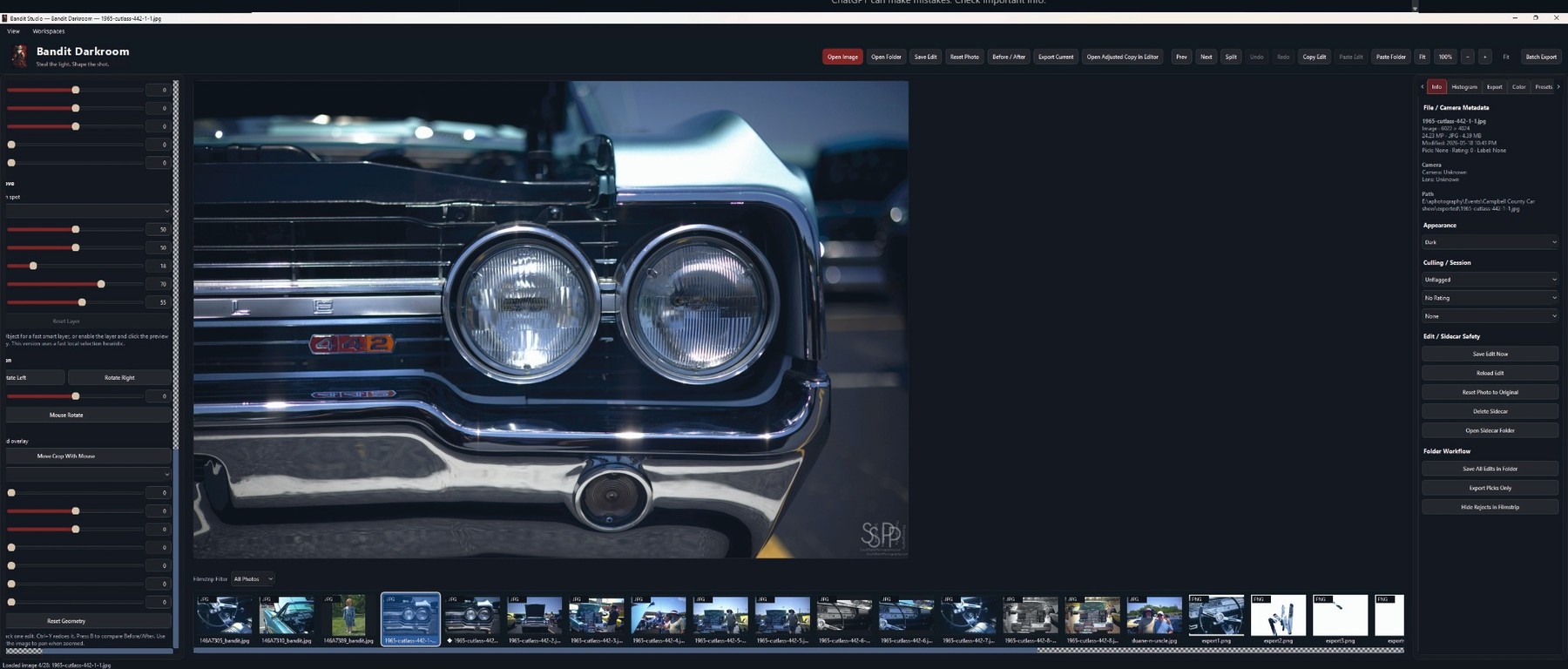
The desktop layout is organized so the photo stays central while the supporting tools remain close. The exact controls may change as the beta evolves, but the main workflow is consistent.
Top toolbarOpen images or folders, save edits, reset photos, compare before/after, and export current work.
Center previewReview the active image at usable size. Use fit and zoom controls when checking detail.
Left controlsMake image adjustments, geometry corrections, and workflow changes where available in the beta.
Bottom filmstripMove through the current folder, compare related files, and pick images for testing.
Right panelReview metadata, histogram, export options, color settings, presets, and sidecar safety actions.
Export toolsSend out current edits, test adjusted copies, or run batch export behavior where available.
04
Make a first edit
Open a RAW or image file
Use Open Image for a single file or Open Folder to browse a set. Start with a known image so you can judge behavior accurately.
Check the preview before editing
Use the fit or zoom tools to inspect sharpness, highlight clipping, deep shadows, color shifts, and any loading issues.
Make basic adjustments
Test core sliders and controls such as exposure, contrast, highlight recovery, shadow lift, color response, and geometry tools where they are available.
Compare before and after
Use the before/after or split comparison controls to verify whether each adjustment is predictable and visually useful.
Save the edit
Use Save Edit when you want to preserve the current adjustment state for later testing.
05
Use sidecar and project data safely
Bandit DarkRoom is designed around sidecar-based edit data. This makes it easier to keep the original image separate from the edit instructions and to inspect what the beta is writing.
Save Edit NowWrite the current edit state so it can be restored or inspected later.
Reload EditBring back the saved sidecar/project state for the active image.
Reset Photo to OriginalReturn the view to the unedited source state when testing changes.
Delete SidecarRemove the saved edit data for the current image when you want a clean retest.
Open Sidecar FolderInspect where project data is being stored for the active image or folder.
Use backupsKeep original photos protected while beta behavior is still changing.
06
Export and review output
Export the current photo
Use Export Current to create an edited copy. Check naming, destination, size, color, and whether the output reflects the active edit.
Open adjusted copy in editor
Use this workflow when you want to inspect an exported or adjusted version in another editor after Bandit DarkRoom creates it.
Test batch export carefully
Begin with a small folder. Confirm which files are exported, where they go, and whether individual edits remain consistent.
Review export history
Use export history to confirm that finished files are easy to track during a beta session.
07
Use the filmstrip for review
The bottom filmstrip helps you move through a folder and test how Bandit DarkRoom behaves with related images. It is especially useful for event sets, bracketed images, repeat compositions, and images with similar lighting.
08
Send useful beta feedback
Helpful reports are specific. Include the app version, your operating system, the type of file being tested, what you expected, what happened, and whether the issue repeats.
Good beta report format
Version: 0.2.0 Core RAW Beta RC1
Operating system: Windows 11
Camera/file type: Example RAW/JPEG
What I did: Opened folder, adjusted exposure, exported current image
Expected result: Exported copy matched preview
Actual result: Export looked darker than preview
Repeatable: Yes / No
Notes: Include screenshot or file details when useful
Prepare Beta Signup Email
09
Basic troubleshooting checklist
- Confirm the file opens outside Bandit DarkRoom so you know the source image is valid.
- Try a smaller folder before testing a large shoot.
- Check whether a sidecar file already exists and reload or reset as needed.
- Export to a simple folder path without unusual characters while testing.
- Restart the app and repeat the same steps to see whether the issue is consistent.
- Keep original photos backed up and avoid testing only with irreplaceable files.